Case Study

Batch uploads,
auto-captioned.

Scans image batches and generates SEO-optimised titles, descriptions, and keyword sets ready for Adobe Stock Contributor submission. Follows Adobe's submission rules.

Status Live · Internal
Client JQ Internal
Category Stock Content Automation
Built 2026
At a glance

What is Adobe Stock Uploader?

The Adobe Stock Uploader is an internal Python tool that takes a folder of images (typically 50-200 Midjourney generations at a time) and produces Adobe Stock Contributor-ready metadata for every file: SEO-optimised title, 200-character description, 25-49 keywords, and category assignments. Built to support a 14,000+ image Adobe Stock portfolio without the soul-crushing manual captioning work.

The Problem

What was broken.

Running an Adobe Stock Contributor portfolio at scale (14,000+ images and 1,000+ videos) means submitting a lot of metadata. Every upload needs a title, a 200-character description, 25-49 keywords, and one or two category assignments. Do it wrong and Adobe rejects the submission. Do it too fast and the quality drops and the images never get discovered.

The manual version of this workflow was brutal. Open an image, look at it, write a title that includes the subject and the style, write a description with the right keywords for discovery, brainstorm 25-49 keywords without repeating or straying off-topic, pick categories, repeat. At 30 seconds per image, 100 images a batch, that is nearly an hour of staring at your own work and trying to describe it from scratch.

The real bottleneck was not the keywords. It was mental fatigue. After 20 images the descriptions started blending together, the titles started using the same phrases, and the keyword sets got lazy. Adobe\'s discoverability algorithms notice.

The Approach

What was built.

The system uses a two-model pipeline: a vision model looks at each image and extracts a detailed visual description (subjects, style, colour palette, mood, composition), then Claude takes that visual description and produces the Adobe-specific metadata using a prompt that encodes Adobe\'s submission rules and best practices.

The Claude prompt includes the Adobe submission guidelines explicitly: title length, description character count, keyword count range, trademark rules, prohibited content rules, style vocabulary preferred by Adobe\'s search algorithm. Every output is pre-validated against these rules before it gets written to the CSV.

The final output is a CSV file in Adobe\'s exact import format. Drop it into Adobe Stock Contributor\'s batch upload tool and every image is ready to submit in under a second per file.

How It Works

Architecture in plain English.

01
Folder scan
The user points the tool at a folder of images. The pipeline reads every file, skips anything already processed, and queues the new ones for metadata generation.
02
Vision description
Each image runs through a vision model (Claude Sonnet 4.6 with vision) that extracts a detailed visual description: subjects, style, mood, colour, composition, lighting.
03
Claude metadata
The visual description is passed to Claude with a prompt encoding Adobe's rules. Claude writes the title, description, keyword set, and category assignments in the exact Adobe format.
04
Rule validation
Before anything is written, the output is validated against Adobe's rules: title length, keyword count, forbidden words, duplicate detection, character limits.
05
CSV export
A single CSV file exports in Adobe Stock Contributor's exact import format. Drop it into the upload tool and the batch is ready to submit.
Try It

See it in action.

Interactive walkthrough

Watch the full pipeline in action: scanning a folder of Midjourney images, generating SEO titles and keywords with Claude vision, validating against Adobe rules, exporting a ready-to-upload CSV, and importing into Adobe Stock Contributor.
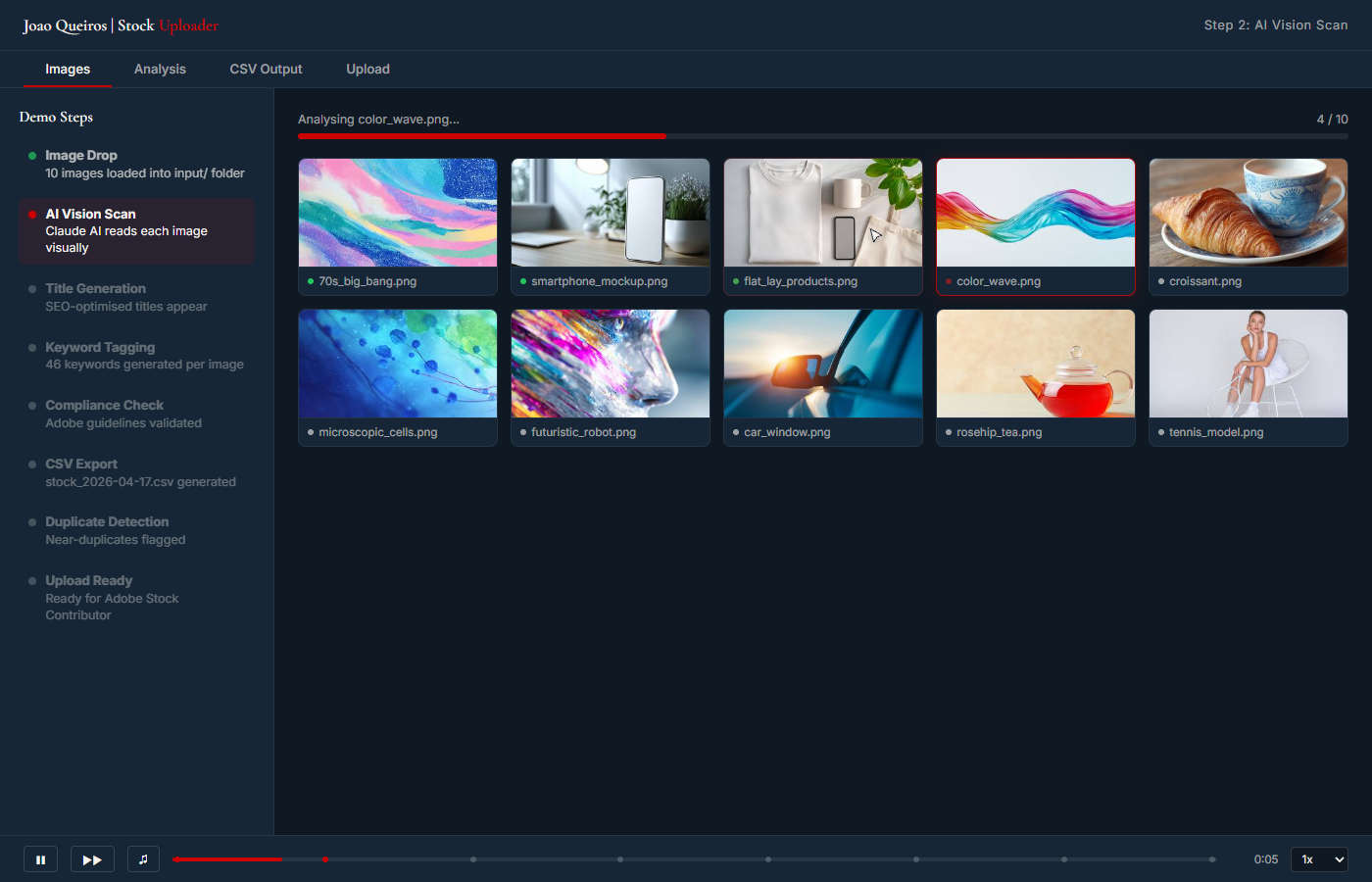
Adobe Stock Uploader dashboard showing image grid, AI-generated metadata, keyword typing, and CSV export
Launch Interactive Demo

Guided walkthrough with sample data. The live system processes real image folders.

Stack

Built with.

Python 3 Claude API Claude Sonnet 4.6 (vision) PIL / Pillow CSV export Adobe Stock rules
Outcomes

What changed.

30s → 2s metadata per image
14,000+ image portfolio managed
1,000+ videos also supported
99%+ Adobe rule compliance

The interesting lesson here is about validation. The Claude output would be 95% correct without any rule validation, and Adobe would reject about 5% of the submissions for small rule violations (title too long, keyword too generic, etc.). Adding a validation layer that corrects those before they reach Adobe pushed the approval rate to 99%+. The validation is where the real production discipline lives.

Free Consultation

Want a system
like this one?

Book a free 30-minute call. We map your situation, scope a similar build, and agree on a fixed quote before anything starts.

Book Free 30-min Call